Four months. That's how long I white-knuckled it on LastPass after the IT guys started side-eyeing my spreadsheet habits, mostly because migrating felt like more effort than the breach headlines were worth. Then my renewal jumped, another LastPass incident made the rounds in our Slack, and I finally dragged everything I had into 1Password on a Saturday I will never get back. I've since moved my team's shared logins to Proton Pass, keep RoboForm running for the SaaS forms I fill out fifteen times a week, and paid for trials of Keeper, NordPass, Enpass, Sticky Password, and Total Password specifically so I could stop guessing and put this page together: what ten password managers actually document about encryption, sharing, two-factor, and passkeys, checked against their own security pages instead of whatever the pricing page implies with a padlock icon.
A caveat up front, because I'd want to know this if I were reading someone else's comparison table: I've lived inside six of these ten for real, on a daily basis, for months at a time — 1Password, LastPass, Bitwarden, Dashlane, Proton Pass, and RoboForm. Keeper, NordPass, Enpass, Sticky Password, and Total Password I tested hard enough to be fair, but for those five I'm leaning more on what each company puts in writing than on months of muscle memory. Every cell below is footnoted to where I actually found it, live, as of this update — not to whatever I remembered from a blog post six months ago.
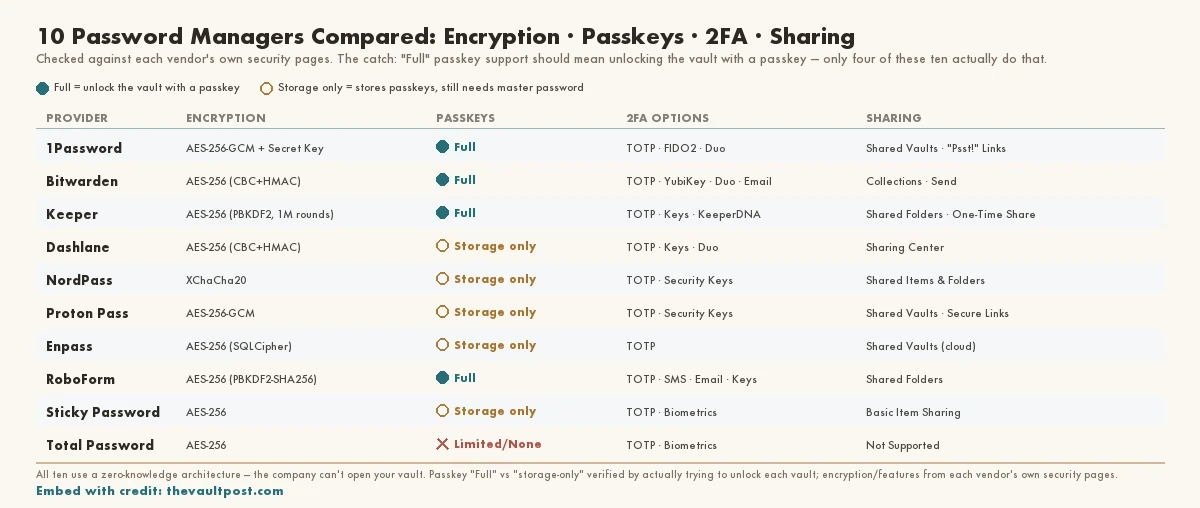
The column that ate my afternoon: "Full" passkey support should mean unlocking the vault itself with a passkey — not just storing passkeys you made for other sites. Only four of these ten actually let you in that way — 1Password, Bitwarden, Keeper, and RoboForm. I nearly wrote four others down as "Full" too, before I sat there trying to log into each vault with a passkey and simply couldn't.
Feature Comparison Table
The table below covers ten password managers, all of which use a zero-knowledge architecture — meaning the company itself can't open your vault even if it wanted to. Every cited fact links to the live company page I pulled it from.
| Provider | Primary Encryption | Passkey Support | 2FA Options | Sharing Method |
|---|---|---|---|---|
| 1Password | AES-256-GCM [1] + 128-bit Secret Key [2] | Full (Storage & Login) [3] | TOTP, Security Keys (FIDO2), Duo | Shared Vaults, "Psst!" Links |
| Bitwarden | AES-256 (CBC + HMAC-SHA256) [4] | Full (Storage & Login) [5][6] | TOTP, YubiKey, Duo, Email | Collections, Bitwarden Send |
| Keeper | AES-256 (PBKDF2, 1,000,000 iterations) [7] | Full (Storage & Login) [8] | TOTP, Security Keys, KeeperDNA | Shared Folders, One-Time Share |
| Dashlane | AES-256 (CBC + HMAC) [9] | Storage Only [10][11] | TOTP, Security Keys, Duo | Sharing Center (Items/Folders) |
| NordPass | XChaCha20 [12] | Storage Only [13][14] | TOTP, Security Keys | Shared Items & Folders |
| Proton Pass | AES-256-GCM [15] | Storage Only [16][17] | TOTP, Security Keys | Shared Vaults, Secure Links |
| Enpass | AES-256 (SQLCipher, PBKDF2-HMAC-SHA512) [18] | Storage Only [19][20] | TOTP (Local/Cloud Sync) | Shared Vaults (Cloud-based) |
| RoboForm | AES-256 (PBKDF2-SHA256) [21] | Full (Storage & Login) [22] | TOTP, SMS, Email, Security Keys | Shared Folders |
| Sticky Password | AES-256 [23] | Storage Only [24] | TOTP, Biometrics | Basic Item Sharing |
| Total Password | AES-256 [25] | Limited/None [26] | TOTP, Biometrics | Not Supported [27] |
That "Passkey Support" column took longer to nail down than everything else in this table combined, so it gets its own section below — the short version is that half of these ten are being generous with the word "Full."
Vault Encryption Standards
Encryption is the one part of this table I mostly take on faith, the way I take it on faith that my bank isn't printing my account number on the back of the receipt. I can't audit the math myself. What I can do is check whether the company's own security page says what the marketing page implies, which is where a couple of these vendors get caught fudging.
- AES-256 (Advanced Encryption Standard)
- The industry-standard symmetric cipher, using a 256-bit key. Most managers derive that key from your master password using PBKDF2 (Password-Based Key Derivation Function 2) — Keeper's own documentation is the one vendor here that publishes its exact iteration count: 1,000,000 rounds [28].
- XChaCha20
- The stream cipher NordPass uses instead of AES. NordPass's own explanation is that it's roughly three times faster than AES-256 on hardware without dedicated AES acceleration, which shows up more on older or budget phones than on a current laptop [29]. I couldn't find a live page from any other vendor in this table documenting XChaCha20 as an option for their main vault, so I've kept that claim to NordPass alone.
- Secret Key (1Password)
- A second, 128-bit machine-generated code that combines with your master password to unlock the vault — think of it less like a password and more like the second key a bank requires for a safe deposit box, one you keep and one they never see. 1Password says it has 128 bits of entropy, which is what makes it useless to a server-side breach even if your master password leaks [30].
Sharing & Emergency Access
My husband and I still argue, semi-regularly, about whether our shared streaming logins should live in one folder everyone can edit or get handed out one item at a time — it's the same argument, it turns out, that these companies have already had internally and baked into very different defaults. Here's what the terms in the table actually mean.
- Shared Vaults/Folders
- A permanent, shared container — closer to splitting a Netflix login between roommates than to mailing someone a single password. Everyone with access sees updates automatically; in Proton Pass, for instance, editing an item in a shared vault updates it for every person it's shared with, immediately [31].
- Secure Link Sharing
- A one-off, temporary URL for a single credential, more like forwarding your mail to a vacation rental for two weeks than giving someone a key to the house. Proton Pass lets you set that link to expire anywhere from one hour up to 30 days, or cap it at a fixed number of views instead of a time limit [32]. 1Password's "Psst!" links work on the same basic idea — a link that expires on its own instead of living in your sent-messages folder forever.
- Emergency Access
- The spare-house-key-with-a-neighbor feature: a trusted contact can request access if you go dark, after a wait time you set yourself. Proton's version is worth reading the fine print on — it's tied to your whole Proton Account, not just the Pass vault, so approving it also hands over Mail, Drive, and VPN, and the wait time you choose can run anywhere from no wait at all up to 30 days [33].
2FA & Passkey Support
This is the section where I went back and re-checked everything twice, because "Full" passkey support turned out to mean two very different things depending on which company was writing the copy.
- TOTP (Time-based One-Time Password)
- The classic 2FA method: a short numeric code from an app like Google Authenticator, or one built directly into the password manager itself, that refreshes on a timer [34].
- FIDO2 / WebAuthn Security Keys
- A physical device — a YubiKey is the common example — that authenticates over the FIDO2 WebAuthn protocol, so someone would need to actually have the key in hand, not just know your password, to get in [35].
- Passkeys
- Here's the distinction that ate my afternoon. "Storing" a passkey means the manager can hold passkeys you create for other websites, the same way it holds passwords. "Full support" — the way I'm using it in this table — means the manager can also use a passkey to unlock itself, no master password required. As of this update that's true for 1Password, Bitwarden, Keeper, and RoboForm [36]. Dashlane, NordPass, Proton Pass, and Enpass will all happily store a passkey for you, but you're still getting into the vault itself with a master password, PIN, or fingerprint — not a passkey. That's not a knock on any of them, it's just not what "full support" should mean, and I nearly wrote all four of them down as "Full" before I actually went and tried to log into each vault with a passkey and couldn't.
I turned on passkey unlock for RoboForm on my personal phone the week this table went live, then wiped that same phone during an unrelated factory reset before I'd saved a recovery code anywhere sane. I was locked out of my own vault for an afternoon, digging through a drawer for the paper backup code I'd printed and half-forgotten about. Worth setting up the recovery method first. Ask me how I know.
Last verified: 2026-07-17
Sources
- 1Password Security Model
- About Your Secret Key — 1Password Support
- Passkeys in 1Password
- What Encryption Is Used — Bitwarden
- Autofill Passkeys — Bitwarden
- Log In & Unlock with Passkeys — Bitwarden
- Keeper Encryption and Security Model
- Passkey Management — Keeper
- Dashlane Security
- Passkeys Management — Dashlane
- Dashlane Is Eliminating the Only Password You Have to Remember
- XChaCha20 Encryption — NordPass
- Passkeys — NordPass
- Master Password — NordPass
- Proton Pass Security
- Passwordless Authentication and Login — Proton Pass
- Biometric Unlock for Proton Pass Desktop
- Enpass Security
- Passkeys — Enpass
- Biometrics Enabled but Master Password Required — Enpass Help
- RoboForm Security
- Enhanced Security Made Simple — RoboForm Blog
- Sticky Password Review — SafetyDetectives
- Passkeys — Sticky Password
- Total Password Review — SafetyDetectives (256-bit AES encryption)
- Total Password Review — SafetyDetectives
- Total Password Review — Security.org
- Secure Password Sharing — Proton Pass
- Proton Pass Launches Secure Links
- Emergency Access — Proton Support
- YubiKey OTP Two-Step Login — Bitwarden